


This printer guide helps you ditch the drama and find a reliable co-pilot for your paper projects.
Welcome to our exploration into the world of technology. If you’ve been keeping up with our recent posts on “Sales Equipment for Improved Retail Efficiency” and “Door-to-Door Courier: How to Arrange Your Own Shipping and Find the Best Prices in South Africa – Your Shipping, Your Way,” you’re already on the path to navigating the tech landscape.
Today, we’re shifting our focus to a fundamental tool that plays a crucial role in our daily lives – the printer. Whether you’re a small business owner seeking efficiency or a homeowner looking for a reliable printing companion, this guide is tailored just for you.
In the upcoming sections, we will delve into the diverse realm of printers, helping you decipher the nuances between multifunction printers, laser printers, inkjet printers, dot matrix printers, card printers, and thermal printers. Additionally, we’ll look at ink cartridges, toners, and other essential accessories that play a crucial role in your printing experience.
Are you on the lookout for a new printer but overwhelmed by the myriad options available? Fret not! This guide is specifically curated for individuals like you, providing insights and clarity to facilitate the decision-making process. Whether it’s for your home office or business establishment, we aim to help you make an informed choice and find a printing companion that suits your unique needs.

Understanding Your Needs
In the quest for the perfect printer, the first step is a thorough self-assessment of your printing needs. Whether you’re managing a bustling home office or steering the ship of a thriving business, understanding your requirements is pivotal.
Begin by evaluating the frequency and scale of your printing needs. Are you someone who prints occasionally, or does your business demand a constant stream of printed materials? This initial self-reflection will serve as the compass guiding you through the myriad printer options available.
Consider the volume of pages you expect to print on a daily or monthly basis. Different printers cater to varying capacities, so aligning this aspect with your anticipated usage ensures you don’t end up with a printer that falls short or exceeds your requirements.
Beyond the basic printing needs, identify any special requirements that might influence your decision. Do you often find yourself in need of high-quality photo prints? Or perhaps your business demands crisp graphics for presentations and marketing materials. Understanding these nuances will steer you towards printers equipped with the features necessary for your specific tasks.
This initial phase of self-discovery lays the foundation for a well-informed decision. Remember, the goal is to match the printer to your unique needs, ensuring a seamless integration into your home or business environment. So, take a moment to reflect on your printing habits and envisage the capabilities your ideal printer should possess.
Types of Printers
Multifunction Printers
Multifunction printers, often referred to as all-in-one printers, stand as versatile workhorses in the world of printing technology.
Multifunction printers, as the name suggests, combine multiple functionalities in a single device. Typically, these printers integrate printing, scanning, copying, and faxing capabilities. This consolidated approach streamlines your office setup, eliminating the need for separate devices for each task.
Advantages and Potential Drawbacks
Advantages:
- Space Efficiency: Save valuable workspace by consolidating multiple devices into one.
- Cost-Effective: Generally more economical than purchasing individual devices for each function.
- Versatility: Cater to diverse needs without compromising on quality.
Potential Drawbacks:
- Single Point of Failure: If one function malfunctions, it may affect the entire device.
- Advanced Features: Specialized devices may offer more advanced features in their respective areas.
Ideal Use Cases
Multifunction printers find their stride in various environments, particularly where versatility is paramount. Consider these ideal use cases:
- Home Offices: Compact and efficient, ideal for the limited space of a home office.
- Small Businesses: Streamline operations with a single device that covers multiple needs.
- Workgroups: Suited for collaborative settings where different functions are regularly required.
When contemplating a multifunction printer, weigh the advantages against potential drawbacks and assess how well it aligns with your specific needs. This category often proves to be a reliable choice for those seeking an all-encompassing printing solution without compromising performance.
Laser Printers
Laser printers have long been stalwarts in the world of efficient and high-speed printing.
Laser printing employs a unique process that involves the use of a laser to produce images on a rotating drum. This drum attracts and fuses toner particles onto the paper, creating sharp and precise prints. Known for their speed and precision, laser printers have become synonymous with professional document production.
High-speed printing and Cost-efficiency
High-speed printing is a hallmark feature of laser printers. These devices can churn out pages at an impressive rate, making them an excellent choice for environments where time is of the essence. Moreover, laser printing often proves to be cost-effective in the long run, especially for high-volume printing. The cost per page is generally lower compared to inkjet counterparts, making them economical for businesses with substantial printing needs.
Suitable Applications and Industries
Laser printers find their niche in various applications and industries:
- Office Environments: Ideal for the fast-paced demands of office settings with frequent document printing.
- Business Reports and Documents: Produces crisp and professional-looking documents, perfect for business reports and other formal paperwork.
- Legal and Administrative: Commonly used in legal offices and administrative settings due to their speed and precision.
The efficiency, speed, and cost-effectiveness of laser printers make them a go-to choice for those prioritizing productivity. If your printing needs involve a substantial volume of text documents and you value swift, high-quality output, a laser printer might be the perfect fit for your home or business.
Inkjet Printers
Inkjet printers bring a splash of colour and versatility to the printing landscape.
Inkjet technology works by propelling tiny droplets of liquid ink onto paper, creating vibrant and detailed prints. This method allows for precise control over the placement of ink droplets, resulting in high-resolution and visually appealing output.
Colour Printing Capabilities
One of the standout features of inkjet printers is their exceptional colour printing capabilities. Whether you’re producing marketing materials, presentations, or colourful graphics, inkjet printers excel at delivering vibrant hues. The ability to reproduce a wide spectrum of colours makes them a favourite for creative projects.
Photo Printing Quality and Considerations
Inkjet printers have become synonymous with photo printing excellence. The combination of multiple ink cartridges, including dedicated ones for different colours, enables the reproduction of intricate details and gradients. When selecting an inkjet printer for photo printing, consider:
- DPI (Dots Per Inch): Higher DPI results in sharper and more detailed prints.
- Ink Quality: Look for printers with high-quality inks to ensure longevity and colour accuracy.
- Paper Compatibility: Choose photo paper that complements your printer for optimal results.
Inkjet printers are an excellent choice for those who prioritize colour accuracy and require the flexibility to print a variety of documents, from vibrant graphics to high-quality photographs. Whether you’re a hobbyist photographer or a business with creative printing needs, an inkjet printer can bring your visuals to life.
Dot Matrix Printers
Dot matrix printers, though less common in today’s landscape, serve specific niche purposes with their unique technology.
Dot matrix printers find their place in specialized applications where their particular features are indispensable. Some niche use cases include:
- Carbon Copy Printing: Dot matrix printers are still valued for their ability to create carbon copies by using multipart forms.
- Continuous Forms: Ideal for printing continuous forms with perforations, commonly used in manufacturing and logistics.
Impact Printing Technology
Dot matrix printers use impact printing technology, where a print head strikes an ink-soaked ribbon against the paper, creating characters through a series of dots. This method allows for reliable printing on multipart forms and through multi-layered sheets.
Considerations for Specific Industries
Certain industries benefit from the unique capabilities of dot matrix printers:
- Manufacturing: Dot matrix printers are efficient for printing invoices and labels in manufacturing environments.
- Logistics: Continuous form printing is valuable for generating shipping labels and receipts in logistics operations.
While dot matrix printers may not be as prevalent as other types, they continue to play a crucial role in industries where their specific features meet essential requirements. If your business involves carbon copy printing or requires continuous form capabilities, a dot matrix printer might be the reliable workhorse you’re seeking.
Card Printers
Card printers stand as specialized tools designed for precision and security in identification and branding.
Card printers are specifically engineered for the production of identification cards and badges. This category of printers excels in creating high-quality, durable cards that serve various purposes, from employee identification to access control.
Quality and Security Features
- High-Quality Printing: Card printers ensure sharp and clear printing, incorporating intricate details such as photos and text.
- Durable Materials: Cards printed with these machines often use materials resistant to wear and tear, ensuring longevity.
- Security Features: Many card printers include security elements like holographic overlays and encoding options to enhance card security.
Use Cases in Businesses and Organizations
Card printers have found applications in diverse business and organizational settings:
- Corporate Offices: Issuing employee ID cards for secure building access and identification.
- Educational Institutions: Producing student ID cards for access to facilities and services.
- Healthcare: Creating identification badges for healthcare professionals to ensure secure access to sensitive areas.
The precision and security features inherent in card printers make them indispensable tools for organizations requiring a reliable method of producing identification cards with enhanced durability and security features. If your business involves the issuance of ID cards or badges, a card printer can provide the professionalism and security you need.
Thermal Printers
Thermal printers, known for their efficiency and reliability, come in two main technologies: direct thermal and thermal transfer.
Direct Thermal and Thermal Transfer Technologies
- Direct Thermal Technology:
- Utilizes heat-sensitive paper.
- The print head selectively heats the paper to create images.
- Ideal for short-term applications, such as shipping labels.
- Thermal Transfer Technology:
- Uses a thermal ribbon to transfer ink onto the paper.
- Suitable for long-lasting prints on materials like labels and tags.
- Ideal for applications requiring durability and resistance to environmental factors.
Applications in Retail, Logistics, and More
Thermal printers have carved a niche in various industries due to their speed and reliability:
- Retail: Ideal for printing receipts, labels, and barcodes swiftly at point-of-sale terminals.
- Logistics: Essential for generating shipping labels with clear barcodes for tracking.
- Healthcare: Used for printing wristbands and labels for specimen tracking.
Longevity and Cost Considerations
- Longevity: Thermal printers are renowned for their robustness and minimal maintenance requirements.
- Cost-Effective: While initial costs might vary, the long-term operational costs can be lower due to fewer consumables and less frequent maintenance.
Thermal printers offer a swift and efficient solution for businesses requiring on-demand printing with minimal hassle. Understanding the distinctions between direct thermal and thermal transfer technologies allows you to choose a printer that aligns with the demands of your specific industry and applications.
Ink Cartridges/Toner and Accessories
Ink Cartridges
Different Types of Ink Cartridges
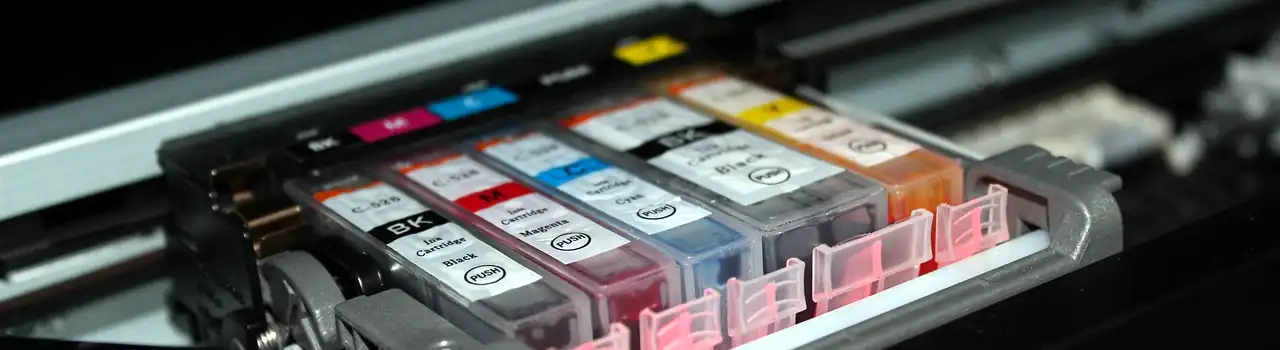
Ink cartridges are the lifeblood of your inkjet printer, and understanding the types available can impact your printing experience.
- Original Equipment Manufacturer (OEM) Cartridges:
- Manufactured by the printer’s brand.
- Typically the most expensive option but assures compatibility.
- Compatible Cartridges:
- Third-party alternatives are designed to work with specific printer models.
- Generally more cost-effective but may vary in quality.
- Remanufactured Cartridges:
- Original cartridges that have been refurbished and refilled.
- A more eco-friendly option that can offer significant cost savings.
Page Yield and Cost per Page Considerations
- Page Yield:
- Indicates the number of pages a cartridge can print.
- Consider your printing volume to choose a cartridge with an appropriate page yield.
- Cost per Page:
- Calculated by dividing the cartridge price by its page yield.
- A lower cost per page is more economical for high-volume printing.
Recycling and Environmental Impact
- Recycling Programs:
- Many manufacturers offer cartridge recycling programs.
- Return used cartridges to designated collection points for proper disposal or recycling.
- Environmental Impact:
- Consider the materials used in cartridges.
- Some brands focus on eco-friendly materials and sustainable practices.
Understanding the different types of ink cartridges, considering page yield and cost per page, and being mindful of recycling options can contribute to a more cost-effective and sustainable printing experience. Make informed choices based on your budget, printing needs, and environmental considerations.
Toner
Toner is the powdered substance used in laser printers to create high-quality prints. Understanding its characteristics and options is crucial for optimal laser printer performance.
- Powdered Formulation:
- Toner consists of fine powder composed of polymers and pigments.
- Electrostatically charged and adheres to the printer drum for image formation.
- Colour Variations:
- Black is the most common, but colour laser printers use multiple toner cartridges for diverse hues.
High-Yield Options and Cost-Effectiveness
- High-Yield Cartridges:
- Designed for heavy printing tasks, high-yield cartridges contain more toner.
- Cost-effective for businesses with substantial printing requirements, reducing the frequency of replacements.
- Cost per Page:
- Calculating the cost per page helps assess the overall economic efficiency of the toner.
- High-yield options often offer a lower cost per page, making them suitable for large-volume printing.
Recycling Practices
- Manufacturer Programs:
- Many toner manufacturers have recycling initiatives.
- Return used toner cartridges to designated collection points to facilitate proper recycling.
- Third-Party Recycling Services:
- Several third-party services specialize in toner cartridge recycling.
- Explore local options for environmentally responsible disposal.
Understanding the intricacies of laser printer toner, opting for high-yield options, and participating in recycling practices contribute not only to cost-effectiveness but also to environmental sustainability. Make choices aligned with your printing needs while being mindful of the ecological impact of toner disposal.
Printing Accessories
Printing Paper
Selecting the right paper is a crucial aspect of achieving optimal print quality and longevity for your printer.
- Paper Type:
- Choose paper based on your printing needs – standard, glossy for photos, or speciality paper for projects.
- Ensure the paper weight is compatible with your printer specifications.
- Compatibility:
- Verify that the paper you choose is suitable for your printer type (laser, inkjet, etc.).
- Adjust printer settings to match the selected paper type for optimal results.
Printer Maintenance Kits
Regular maintenance ensures your printer functions smoothly over the long term. Maintenance kits play a pivotal role in this process.
- Contents of Maintenance Kits:
- Typically includes items like cleaning materials, replacement parts, and instructions.
- Help prevent issues like paper jams and ensure consistent print quality.
- Scheduled Maintenance:
- Follow the manufacturer’s recommended maintenance schedule.
- Regular cleaning and part replacement can extend the lifespan of your printer.
Connectivity Options (USB, Wireless, etc.)
- USB Connectivity:
- Reliable and common, USB connections offer a direct link between your computer and printer.
- Suitable for single-user setups and straightforward printing needs.
- Wireless Connectivity:
- Enables printing from multiple devices without physical connections.
- Ideal for shared offices or homes with multiple users.
- Network Connectivity:
- Printers with network capabilities can be shared across multiple users on the same network.
- Suitable for collaborative work environments.
Considering the paper type, incorporating maintenance kits into your printer care routine, and choosing the right connectivity option enhance the overall printing experience. These aspects contribute to efficiency, cost-effectiveness, and the longevity of your printer, ensuring it remains a reliable tool in your home or office.
Key Features to Look For
As you navigate the vast landscape of printers, it’s essential to hone in on specific features that will optimise your printing experience. Print speed is a critical factor, and assessing your individual needs is key. Consider the volume of your printing tasks and how urgently you require the prints. Look for the printer’s Pages Per Minute (PPM) specification, ensuring it aligns with your workflow without compromising quality.
Resolution and print quality are paramount, especially if your printing tasks involve detailed graphics or high-quality photos. Dots Per Inch (DPI) is a metric to scrutinise, with higher DPI contributing to sharper and more detailed prints. Additionally, explore the printer’s quality settings to match them with the nature of your print jobs, ensuring precision in every document.
Connectivity options play a pivotal role in the modern printing landscape. USB connectivity is a reliable choice for individual users with basic printing needs, particularly suitable for small home offices or single-user environments.
On the other hand, wireless connectivity offers the convenience of printing from multiple devices, making it ideal for shared spaces and environments with multiple users. Network connectivity enables printers to be shared across a network of users, a valuable asset in collaborative work settings.
Beyond the basics, consider additional features that enhance functionality. Duplex printing, or automatic double-sided printing, reduces paper usage, making it an environmentally friendly option, especially for businesses focusing on sustainability.
Mobile printing facilitates printing from smartphones and tablets, catering to users on the go or those working in diverse environments. Cloud printing takes accessibility a step further, allowing printing directly from cloud storage services, streamlining workflows and increasing convenience.
By carefully considering these key features, you ensure that the printer you choose not only meets but exceeds your expectations, making every print job a seamless and efficient experience tailored to your unique requirements.

Budget Considerations
When delving into the realm of printers, assessing your budget is a strategic step that goes beyond the initial purchase. Let’s break down the key considerations to make informed financial decisions.
Initial Printer Cost
Begin by evaluating the upfront expense of the printer. Understand that different types and models come with varying price tags. While it might be tempting to opt for the cheapest option, consider the features and functionalities that align with your needs. A slightly higher initial investment might translate into a more efficient and durable printer in the long run.
Operating Costs (Ink/Toner, Paper, Maintenance)
The initial cost is just the tip of the iceberg; operating costs are the ongoing financial commitment. Factor in the expenses associated with ink or toner cartridges, paper, and regular maintenance. High-yield cartridges might have a higher upfront cost but can prove more cost-effective over time, especially in high-volume printing scenarios.
Additionally, choosing the right paper for your printer can impact both print quality and cost.
Long-Term Value and Cost-Effectiveness
Consider the printer’s longevity and its cost-effectiveness over an extended period. Assess customer reviews, expert opinions, and the manufacturer’s reputation for reliability. Some printers might have a lower initial cost but higher long-term expenses due to consumables or maintenance issues.
Invest in a printer that strikes a balance between initial cost, operating costs, and long-term value.
By carefully examining your budget considerations, you position yourself to make a financially sound decision that not only suits your current financial capacity but also aligns with your printing needs in the long term.
Balancing upfront costs with ongoing expenses ensures that your printer serves as a valuable and cost-effective asset for your home or business.
Tips for Maintenance and Troubleshooting
Maintaining your printer is key to ensuring consistent performance and longevity. Here are some practical tips for maintenance and troubleshooting common issues:
Regular Maintenance Routines: Establishing a routine for printer maintenance can prevent potential problems and extend the life of your device. Clean the printhead regularly to avoid ink buildup, check for paper jams, and inspect for any visible wear or damage. Follow the manufacturer’s guidelines for scheduled maintenance, which may include replacing certain components.
Common Printer Issues and Solutions:
- Paper Jams: Clear any paper jams following the printer’s manual. Ensure there are no torn pieces of paper left behind.
- Poor Print Quality: If prints appear faded or streaked, it might be due to low ink levels or a dirty printhead. Clean or replace the printhead and ensure you are using quality ink or toner.
- Printer Not Recognized: If your computer is not detecting the printer, check the connections and ensure drivers are up-to-date.
- Slow Printing: Adjust print quality settings or consider upgrading to a printer with a higher print speed for improved efficiency.
Resources for Technical Support:
- Manufacturer’s Website: Visit the official website of your printer’s manufacturer for user manuals, troubleshooting guides, and driver updates.
- Customer Support Hotline: Utilize the manufacturer’s customer support hotline for assistance with technical issues.
- Online Forums and Communities: Joining online forums related to your printer model or brand can provide insights into common issues and solutions, often shared by experienced users.
- Professional Assistance: If issues persist, consider seeking professional help from certified technicians or authorised service centres.
By integrating regular maintenance practices into your printer care routine and having troubleshooting strategies at your disposal, you ensure a smooth printing experience. Additionally, leveraging the available resources for technical support empowers you to address any challenges efficiently, keeping your printer in optimal condition.

Closing
In conclusion, we hope that this comprehensive printer guide has equipped you with the knowledge to navigate the diverse world of printers, ensuring you find the perfect match for your home or business needs.
From multifunction printers to specialized options like card and thermal printers, we’ve covered it all. Consider your unique requirements, budget constraints, and long-term goals to make an informed decision.
Thank you for joining us on this journey through the intricacies of printers, and we hope this guide proves invaluable in your quest for the ideal printing companion. Stay tuned for the latest products and in-depth reviews.
Stay in touch and sign up in the My Account section for our weekly emails, delivering the latest tech insights directly to your inbox.
As Henry Ford once said, “Quality means doing it right when no one is looking.” Here’s to quality printing and seamless experiences!
Don’t miss out on the opportunity to connect with a community of like-minded individuals who are passionate about shopping, tech, lifestyle, hardware, stationery and MORE. Follow us on Facebook, Twitter, and LinkedIn to stay updated on our latest product releases, tech trends, lifestyle tips, hardware reviews, and stationary must-haves. By connecting with us, you’ll have access to exclusive deals, updates, and the chance to engage in meaningful conversations with others who share your interests. We believe that these interactions will be a source of excitement and inspiration for your shopping and tech endeavours. So, take the next step and hit the follow button today!
Meet The Author

With over 23 years of full-stack development experience, I specialise in creating custom digital solutions that align with your business goals. Proficient in PHP, MySQL, JQuery, HTML, JavaScript, and CSS, I design user-friendly applications that streamline operations and improve data management. My entrepreneurial background gives me practical insight into business challenges, allowing me to craft solutions that are both efficient and strategic. In addition to development, I offer expertise in social media marketing and graphic design, ensuring a comprehensive approach to your digital needs. I am passionate about helping businesses grow through tailored, practical solutions that deliver real, measurable results.
Visit: https://quickfood.co.za/ for more!